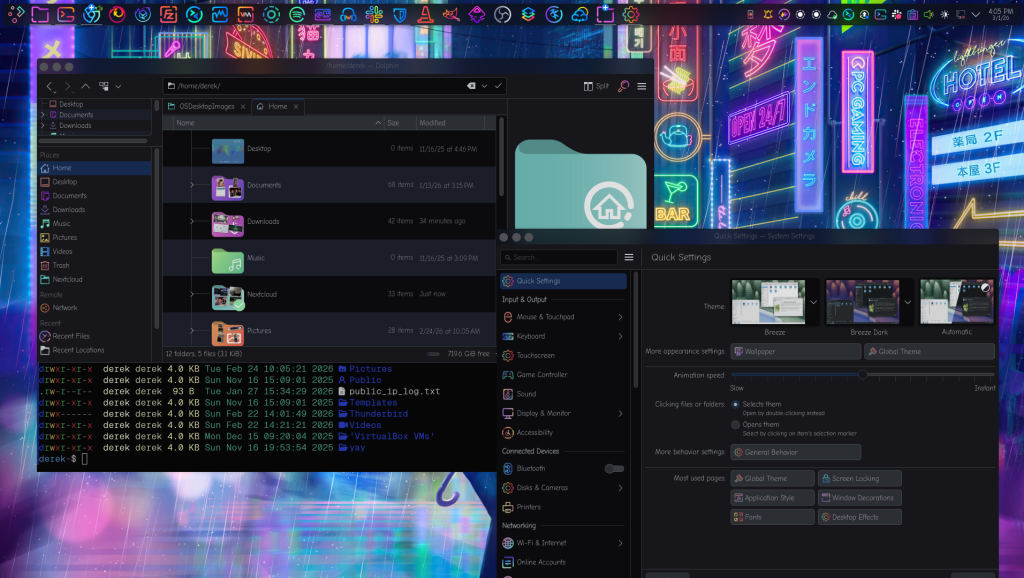
KDE Plasma has long been the “Switzerland” of desktop environments—neutral enough to look familiar to anyone, yet flexible enough to become anything. As of 2026, with the maturity of the Plasma 6 series, it has solidified its reputation as the most feature-rich and visually impressive desktop available for Linux. While it was once criticized for being “bloated,” modern Plasma is remarkably lightweight, often rivaling or even beating more minimalist environments like GNOME or XFCE in terms of RAM usage. It offers a professional, polished aesthetic out of the box that feels at home on high-end workstations and gaming rigs alike.
The defining characteristic of Plasma is its “Simple by default, powerful when needed” philosophy. For a beginner, it provides a standard bottom panel and start menu that feels like a more refined version of Windows. However, for the power user, every pixel is adjustable. You can move panels to any side of the screen, add “Plasmoids” (widgets) for everything from system monitors to weather, and even change the entire window manager behavior. In the latest 6.6 updates, the integration with Wayland has become nearly flawless, offering smooth high-refresh-rate animations and robust HDR support that makes it the premier choice for Linux gamers and creative professionals.
Despite its vast array of features, Plasma 6 focuses heavily on “polish.” Small details, like the KRunner search tool (which can calculate equations, convert currencies, and find files instantly) and the Dolphin file manager, make daily tasks feel effortless. Dolphin is widely considered the best file manager in the Linux world due to its split-view capability and integrated terminal. The recent transition to Qt6 has also brought a modern snappiness to the interface, ensuring that the desktop feels “alive” and responsive even when multitasking with heavy applications.
However, the sheer density of options remains Plasma’s double-edged sword. New users might find the “System Settings” application overwhelming, as it contains hundreds of nested menus for every conceivable tweak. While the community has worked hard to reorganize these menus, there is still a learning curve for those who just want a “set it and forget it” experience. Additionally, because it is so customizable, users who install too many third-party widgets or experimental themes can occasionally run into minor stability issues or visual inconsistencies that aren’t present in more locked-down environments.
The Good Stuff
Infinite Customization: Change every icon, animation, and panel layout.
Performance: Surprisingly low resource usage on modern and old hardware.
Cutting-Edge Tech: Industry-leading support for Wayland, HDR, and VRR.
Powerful Apps: Includes best-in-class apps like Dolphin and Spectacle.
The Reality Check
Option Overload: The settings menu can be intimidating for beginners.
Visual Consistency: Third-party themes can sometimes look “broken” or dated.
Complexity: It is easy to “break” your layout if you tinker too much without a backup.
Minor Papercuts: The sheer scale of the project means small bugs can linger in niche features.