

DE Review: Cinnamon

Cinnamon is arguably the most successful “gateway” desktop environment for users migrating from Windows. Originally spawned as a fork of GNOME 3 by the Linux Mint team, its primary goal was to provide a modern, feature-rich interface that retained the traditional, intuitive layout that millions were already comfortable with. As of 2026, it remains the flagship desktop for Linux Mint and is widely available on major distributions like Fedora, Debian, and Manjaro. Cinnamon has perfectly refined the balance between traditional aesthetics and modern performance, making it one of the most cohesive and “set-it-and-forget-it” experiences available on Linux.
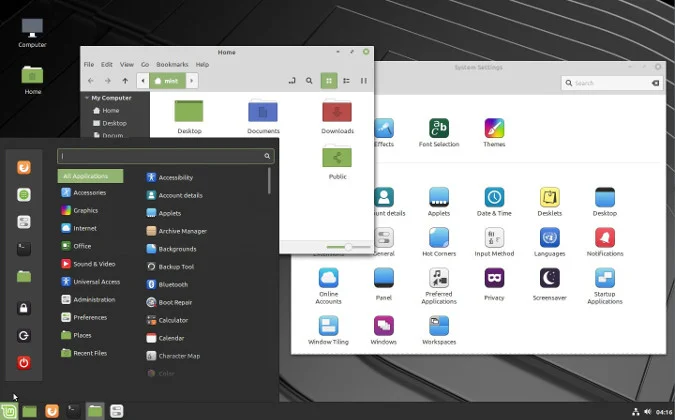
The layout of Cinnamon is instantly familiar: a panel at the bottom of the screen with a “Start” menu (the “Cinnamon Menu”) on the left, a quick-launch area, a taskbar for open windows, and a system tray with clock and indicators on the right. This design philosophy minimizes the learning curve for new users, allowing them to remain productive from day one. However, beneath this traditional exterior lies a highly capable and modernized deskop. It utilizes the modern GTK3 and GTK4 toolkits, providing crisp visuals, elegant themes, and smooth animations without the steep hardware requirements of GNOME.
Customization is a cornerstone of the Cinnamon experience, but it is implemented with user-friendliness in mind. The “System Settings” are incredibly well-organized, centralizing all tweaks into a single, straightforward application. Users can easily download and apply new themes, icon sets, and “Desklets” (widgets) from within the settings manager itself. Additionally, “Extensions” are fully supported, allowing you to add advanced functionality like a unified search or modified tiling effects, but unlike GNOME, these enhancements are designed to be stable and integrated, rarely breaking between minor system updates.
The core application suite that ships with Cinnamon is also exceptional. The Nemo file manager is a standout; it is faster and more feature-rich than its GNOME counterpart, offering split-pane view, integrated terminals, and robust search capabilities out of the box. These utilities, combined with the environment’s inherent stability and efficiency, make Cinnamon an ideal daily driver. While it may lack the high-tech, gesture-driven workflow of GNOME, or the almost absurd level of granular control in KDE Plasma (the advanced customizer, image_1.png), it provides exactly what most users want: a traditional, reliable, and aesthetically pleasing desktop that just works.
OS Pros & Cons
The Good Stuff
Windows-Like: The standard bottom panel and menu are instantly accessible to new migrants.
Efficient: Responsive and smooth on modern hardware; significantly less resource-heavy than GNOME.
Centralized Settings: A single, clear application for managing all desktop tweaks and themes.
Focused Workflow: A traditional taskbar means zero learning curve for switching windows and launching apps.
Stability: Benefitting from years of refinement as Linux Mint’s flagship, leading to zero major bugs.
The Reality Check
Traditional by Design: It lacks the modern, gestural, or mobile-first workflows of GNOME or Budgie.
Innovation Speed: As a “safe and reliable” option, it adopts cutting-edge features and animations slowly.
GTK Complexity: While stable, its reliance on GTK libraries means large themes can sometimes look inconsistent across apps.
Less Flexible for Tiling: Traditional tiling exists, but advanced window tiling requires third-party tools.
Useful Links
-
Official Website: linuxmint.com/cinnamon.php
-
Wikipedia – Cinnamon (Desktop Environment): en.wikipedia.org/wiki/Cinnamon_(desktop_environment)
-
Wikipedia – GNOME 3 (Historical Origin): en.wikipedia.org/wiki/GNOME_3
-
Wikipedia – Nemo (File Manager): en.wikipedia.org/wiki/Nemo_(file_manager)