

DE Review: MATE

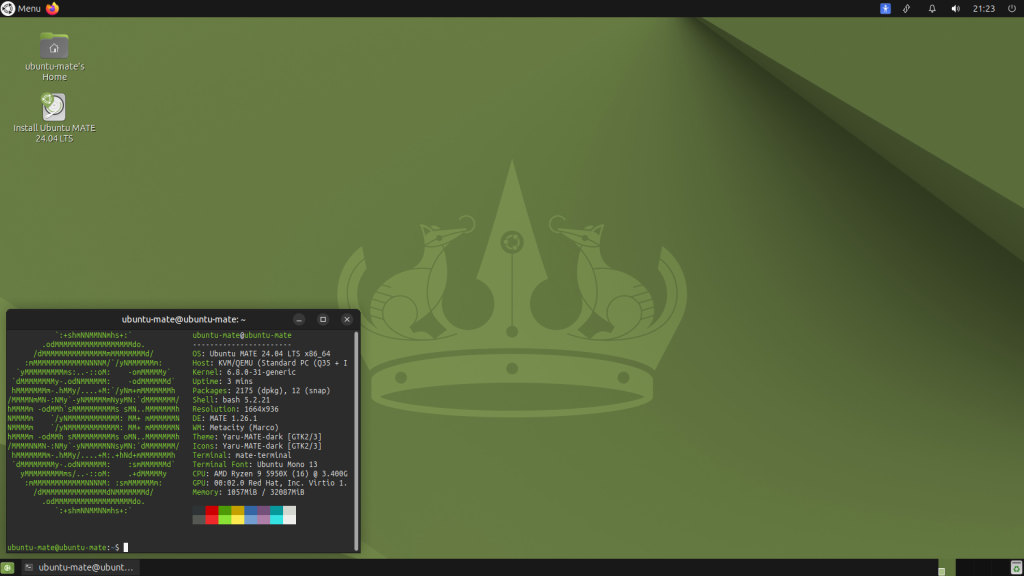
MATE (pronounced MAH-tay) stands as one of the most resilient and reliable desktop environments in the Linux world. Born in the tumultuous wake of the controversial transition from GNOME 2 to GNOME 3, MATE was created by passionate developers who refused to abandon the traditional desktop metaphor. While newer environments like GNOME 40+ or KDE Plasma 6 chase touch gestures and modern animations, MATE offers an unwavering commitment to the classic paradigm: a standard application menu, a versatile panel, a familiar notification area, and traditional window management. For millions of users, MATE is what a computer desktop is supposed to look and feel like.
Performance and stability are the twin pillars of MATE’s identity. Because it preserves the code philosophy of GNOME 2, it is inherently one of the most resource-efficient desktop environments available. MATE can breathe vibrant new life into aging laptops with minimal RAM and older CPUs, often outperforming “lightweight” contenders like Xfce (image_0.png). This efficiency does not come at the cost of functionality; it is a mature, fully featured environment that has spent years polishing its core tools, ensuring that the entire system feels incredibly snappy and robust under load.
MATE’s greatest asset is its suite of powerful, integrated applications. The file manager, Caja, is a refined version of Nautilus, featuring split-view, tabs, and integrated terminal access, which power users rely on. The archive manager, Engrampa, handles compressed files effortlessly, while the text editor, Pluma, remains a fast, reliable, and customizable tool for both simple notes and code editing. These applications don’t just mimic the functionality of modern GNOME equivalents; they often surpass them in reliability and speed, providing a cohesive and productive environment straight out of the box.
Despite its strengths, MATE’s unwavering focus on the past is also its primary challenge. The interface, while incredibly stable, undeniably looks and feels dated compared to the polished, contemporary design of Budgie or COSMIC (as referenced in image_2.png). While you can apply modern GTK themes, the fundamental window decoration, icon placement, and menu layout adhere strictly to early 2010s design standards. Additionally, the transition to modern display technologies like Wayland (which GNOME and KDE have mastered) has been slower for MATE, and while compatibility is improving, it is not yet as seamless or features-rich as the X11 experience, which most MATE users still rely on.
OS Pros & Cons
The Good Stuff
Traditional Desktop: Optimized for a classic keyboard/mouse workflow that ‘just works’.
Mature & Polished: Benefits from over a decade of continuous development, ensuring zero major bugs.
Lightweight: Uses very little RAM and CPU, making it perfect for old and low-power hardware.
High Performance: Provides a snappy, responsive feel, even when multitasking heavily on older tech.
Cohesive Suite: Engrampa (Archive), Atril (Document Viewer), and Eye of MATE (Image Viewer) are all optimized for the environment.
The Reality Check
Aesthetic Lag: The default interface and menu design look and feel dated compared to modern DEs.
Slower Innovation: New features and modern design elements (like gestures) are adopted very slowly.
Wayland Support: While progress is being made, full Wayland compatibility is not yet as polished as GNOME or KDE.
Configuration Complexity: Advanced customization of panels and applets can be less intuitive than modern graphical tools.
Useful Links
- Official Website: mate-desktop.org
-
Wikipedia – MATE (Desktop Environment): en.wikipedia.org/wiki/MATE_(desktop_environment)
-
Wikipedia – GNOME 2 (For Historical Context): en.wikipedia.org/wiki/GNOME_2
-
Wikipedia – Linux Mint (Key Distributor): en.wikipedia.org/wiki/Linux_Mint