

DE Review: Budgie

Budgie has emerged as a significant contender in the Linux desktop landscape, challenging the GNOME and KDE Plasma duopoly with a compelling “middle-ground” philosophy. It was initially developed by the Solus project and is now primarily maintained by the Buddies of Budgie organization. The environment’s distinct identity stems from its reliance on GNOME technologies (like the GTK3 toolkit) while intentionally rejecting GNOME’s “minimalism first” workflow. Budgie provides a familiar bottom-panel, start-menu, and quick-settings experience, optimized for traditional mouse and keyboard interaction.
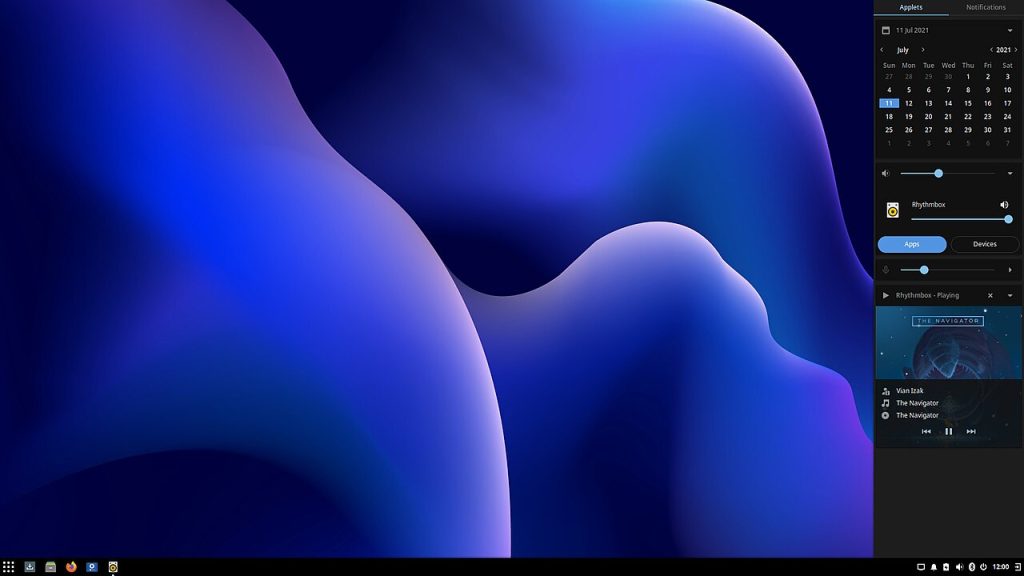
Visually, Budgie is stunning yet lightweight. Its signature component is Raven, a versatile sidebar that slides in from the right. Raven elegantly centralizes notifications, media controls, and customizable “applets” (widgets) like a calendar, weather monitor, and system indicators. This approach brilliantly avoids desktop clutter, reserving the main workspace for applications. Budgie utilizes the polished Adapta or Material themes (seen in images like deepin, image_2.png) by default, resulting in a look that feels both professional and modern, without demanding heavy GPU acceleration.
Performance is another major strength. Unlike its GNOME parent, which can struggle with memory management and older CPUs, Budgie is notably responsive. It boots quickly, uses minimal RAM (often rivaling MATE and Xfce), and feels snappy even when multitasking heavily on moderate hardware. It offers essential desktop features—desktop icons, a sensible “Budgie Menu” with categorization, and intuitive window snapping—out of the box. For users who prefer a traditional, productive workflow without the bloat, Budgie is frequently the top recommendation.
Budgie’s challenge lies in its relationship with GNOME. Because it is a fork of GNOME’s core libraries, its development path is often dictated by decisions made upstream. While major releases, like Budgie 10.9 (and the upcoming transition to GTK4 and Wayland), focus on stability, the environment sometimes lacks the sheer feature density of KDE Plasma (the advanced customizer, image_1.png). It is intentionally focused on refined simplicity, which means power users seeking intricate control over every animation or panel layout might find it too limited. However, for those looking for a elegant, set-it-and-forget-it experience, Budgie succeeds on every level.
OS Pros & Cons
The Good Stuff
Traditional & Familiar: Optimized for a classic keyboard/mouse workflow that ‘just works’.
Polished Out-of-the-Box: Clean, aesthetic visuals with sensible defaults, requiring zero setup.
Efficient Resource Usage: Low RAM footprint; smooth and snappy on older hardware.
Minimal Bloat: A focused core installation that includes only essential applications and tools.
The Reality Check
Dependence on GNOME: Its development is often tied to upstream changes in the GNOME project.
Resource Usage: It is one of the more resource-intensive DEs, demanding more RAM and GPU.
Limited Customization: It is intentionally “opinionated”; you cannot tweak it as extensively as KDE Plasma.
Wayland Support (Current): Its current GTK3 implementation is still stabilizing support for Wayland compared to its X11 maturity.
Smaller Ecosystem: A smaller community of applet developers than GNOME or KDE.
Useful Links
-
Official Website: buddiesofbudgie.org
-
Wikipedia – Budgie (Main): en.wikipedia.org/wiki/Budgie_(desktop_environment)
-
Wikipedia – GTK (Toolkit): en.wikipedia.org/wiki/GTK
-
Wikipedia – GNOME (For Context): en.wikipedia.org/wiki/GNOME