

DE Review: Gnome

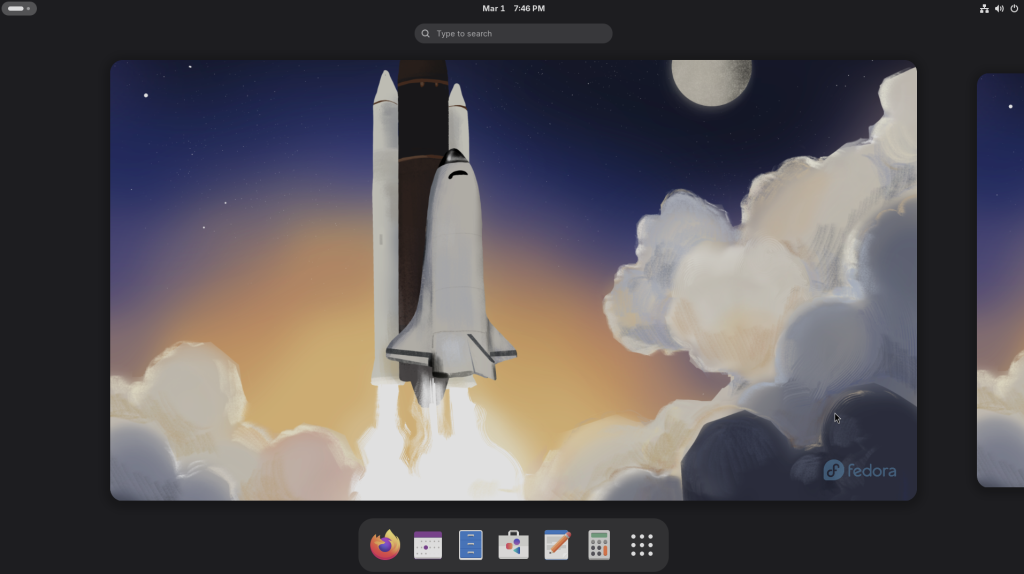
GNOME, in its modern iteration (GNOME 40 and beyond), stands as the most prominent and widely adopted desktop environment in the entire Linux ecosystem. It is the default interface for major distributions like Ubuntu, Fedora, and Debian, defining the “out-of-the-box” experience for millions. GNOME’s core philosophy is radically different from the traditional, Windows-like paradigm seen in environments like Cinnamon or MATE. It champions a clean, distraction-free environment that prioritizes a single focused task, leveraging a powerful workflow built around the “Activities Overview” to manage applications and virtual desktops.
The visual signature of GNOME is its sleek, minimal panel and its heavy reliance on gestures (especially on laptops with Wayland) and keyboard shortcuts. The workspace feels open and light, with window management handled fluidly rather than by a persistent taskbar. The Adwaita design language, standard since GNOME 40, uses rounded corners, subtle shadows, and a refined color palette that feels professional and contemporary. A standout feature is the unified Quick Settings menu, which elegantly condenses Wi-Fi, Bluetooth, power profiles, and a screenshot tool into a single, intuitive interface, minimizing clutter and maximizing accessibility.
GNOME’s integration extends deeply into its core applications. The default file manager, Nautilus (now just “Files”), is simple yet powerful, featuring built-in search that indexes your home directory, list views with batch renaming, and seamless integration with cloud services like Google Drive and Nextcloud. GNOME’s internal software center is also highly robust, serving as a unified storefront for native applications (RPM, DEB) and Flatpaks, making software installation and updates seamless. For power users, the GNOME Extensions ecosystem is indispensable, allowing you to easily add functionality like a persistent dock (via Dash to Dock), top-bar system monitors, or customized tiling window management.
However, GNOME’s deliberate simplicity is also its most frequent source of criticism. By moving configuration options into extensions rather than core settings, new users often feel restricted. Basic features that are standard elsewhere, like minimizing windows to a dock, rearranging the top panel, or even creating desktop icons, require third-party tools (GNOME Tweaks) and extensions, which can sometimes break during major upgrades. Furthermore, while performance has improved significantly with memory leaks patched and animations optimized (especially in the GNOME 45/46 cycles), it remains one of the more resource-heavy desktop environments. Older hardware, which might fly with Xfce (as seen in image_2.png), can struggle to render GNOME’s visually demanding animations smoothly.
OS Pros & Cons
The Good Stuff
Modern & Minimalist: A sleek, focused interface that minimizes distractions and feels contemporary.
Intuitive Overview Workflow: Managing workspaces and finding apps via the ‘Super’ key is fast and fluid.
Excellent Gestures: Industry-leading touchpad/touchscreen gestures (perfect for laptops with Wayland).
Deep Integration: Polished core apps (like Files, Software) that integrate flawlessly with online accounts.
The Reality Check
Extension Dependence: Essential customization requires 3rd-party extensions (which can break).
Resource Usage: It is one of the more resource-intensive DEs, demanding more RAM and GPU.
Opinionated Design: The rigid, “minimal by default” paradigm can frustrate power users.
Limited Settings: Basic options (like a “minimize to dock” behavior) are not natively adjustable.
Useful Links
- Official Website: gnome.org
- Wikipedia – GNOME (Main): en.wikipedia.org/wiki/GNOME
- Wikipedia – GNOME Shell: en.wikipedia.org/wiki/GNOME_Shell
- Wikipedia – Adwaita (Design Language): en.wikipedia.org/wiki/Adwaita